Character
You can manage your owned items and view detailed information about your character through the Character Menu. You can also change the equipped status of various gear items, including Crafted Equipment, Magic Stones, Mystical Piece, Dragon Artifacts, Transference Equipment, and Appearance Equipment.
Equipment
- You can access the Equipment window by tapping the Equipment icon at the top right of the screen or by navigating to Menu > Character > Equipment.
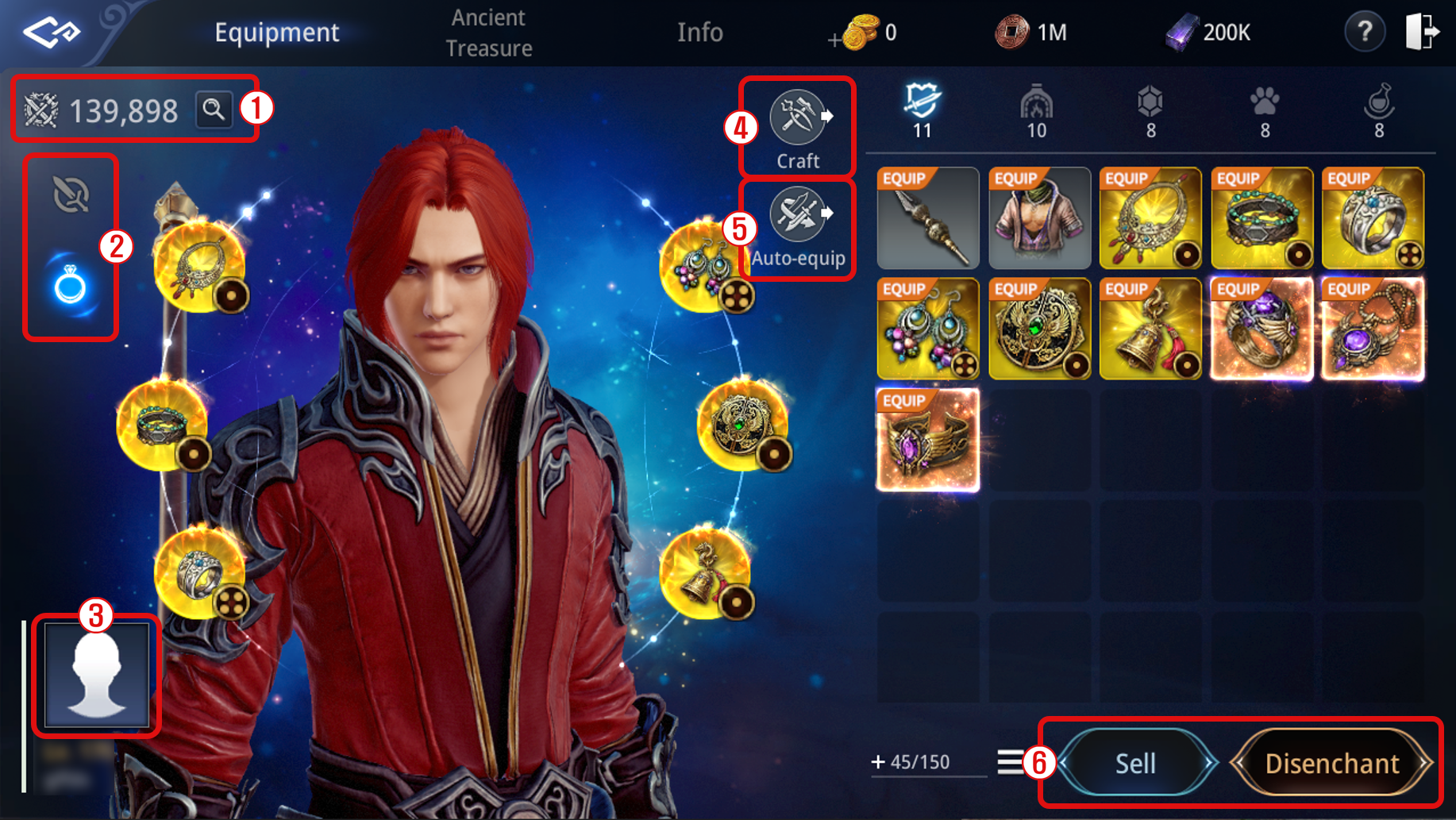
① You can view your character’s Power Score. Tap the magnifying glass icon to check detailed stats.
② You can view the equipment currently equipped by your character.
- Weapons and Armor: View equipped Weapon, Secondary Weapon, Top, Bottoms, Gloves, and Boots.
- Accessories: View equipped Necklace, Bracelet, Ring, Earrings, Medallion, and Charm.
③ You can change your profile image.
④ You can access the Craft window.
⑤ You can automatically equip the gear with the highest Power Score.
⑥ Use the buttons on the right side of the screen to sell unused items or disenchant them.
Info
Access the Info menu from Character - Equipment window, where you can view your character's basic information.
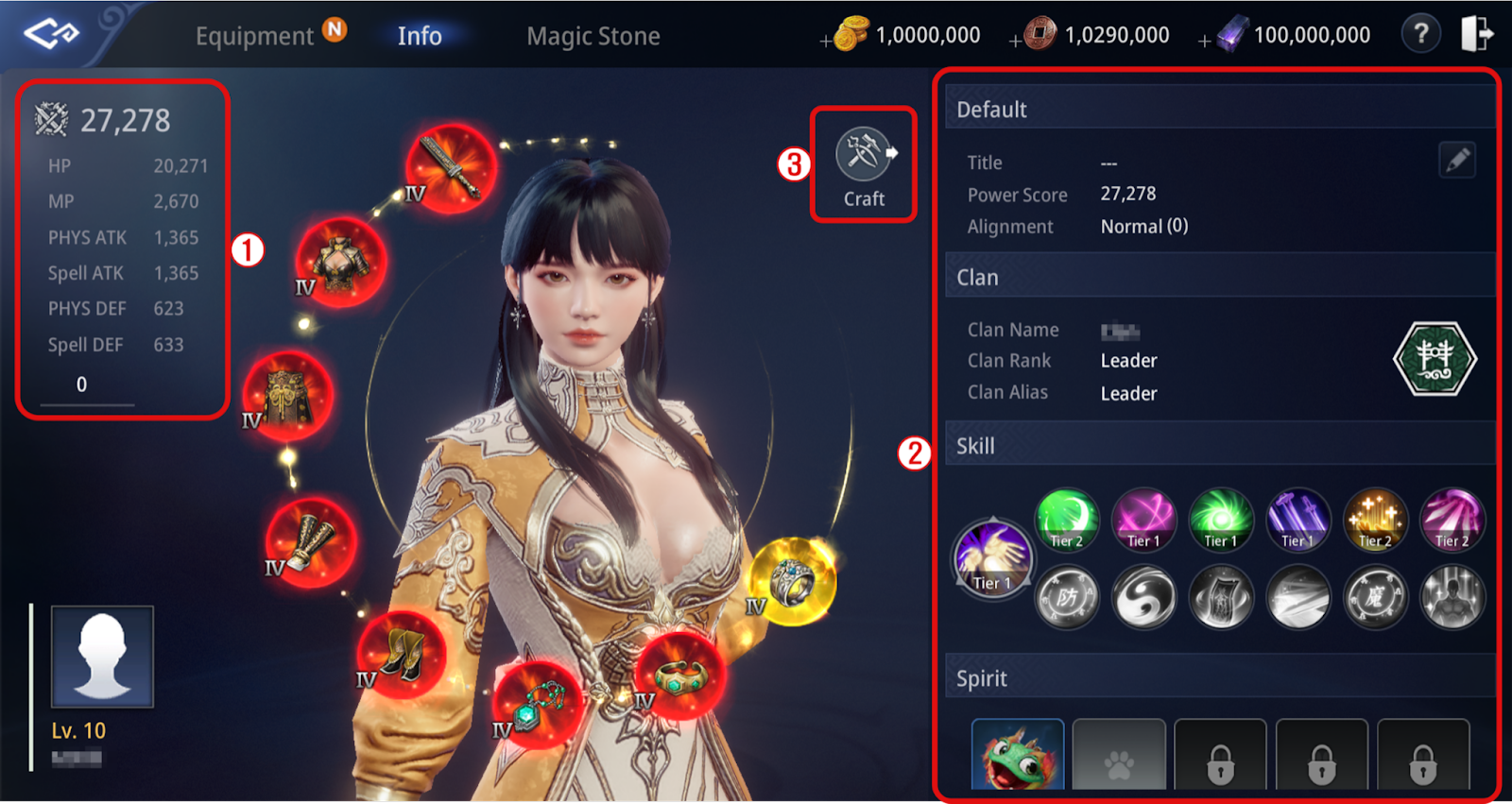
① View your character's Power Score and press the '+ Details' button to check detailed stats.
② View your Title/Power Score/Alignment/Clan/Skill/Spirit information.
③ Tapping the Craft button opens the Craft > Crafting Equipment window.
Magic Stone
Tap Character - Magic Stone in the Menu or click the Magic Stone tab at the top left of the Equipment window.
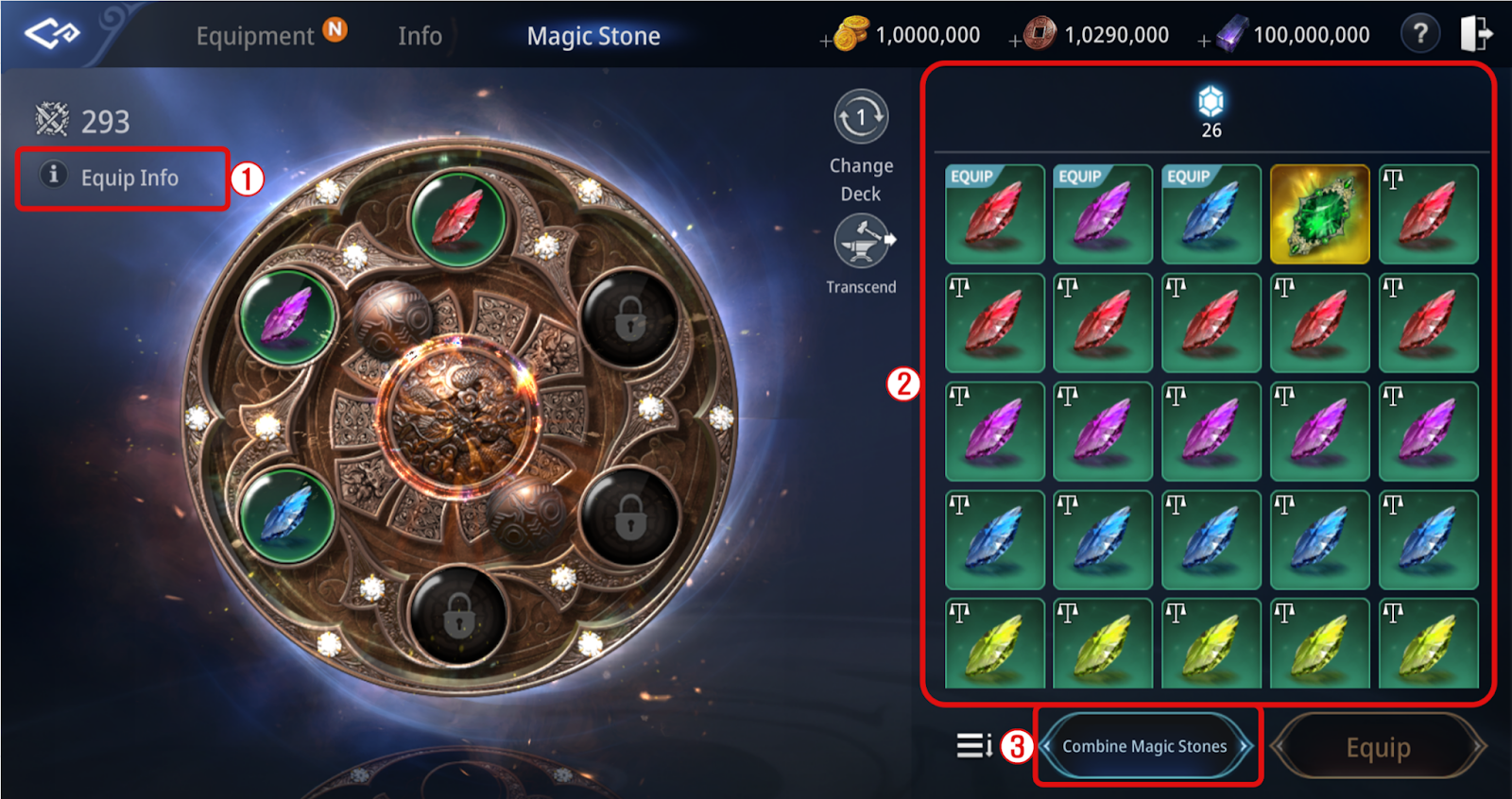
① View the information about the stats applied by equipping Magic Stones
② Equip or remove Magic Stones
③ Tap the 'Combine Magic Stones' button to access Craft > Combine
■ Spectrumite
[Basic information of Spectrumite]
- Item Type : Tradable / Non-tradable
- Grade : Uncommon / Rare / Epic / Legendary
- Option : There is no fixed option, and maximum of 6 random options will be applied.
1) Uncommon : 3 Types of Random Options
2) Rare : 4 Types of Random Options
3) Epic : 5 Types of Random Options
4) Legendary : 6 Types of Random Options
- Option type : 5 Types of New options(Hunting EXP Boost, Gathering Boost, Mining Boost, Energy Gathering Boost, and Darksteel Gain Boost) will be added to pre-existence Magic Stone's Option types.
* Option stat : 1.5 times higher ability stats among the Magic Stones with the same grade.
- Combine : Spectrumite can only be combined with Spectrumites.
[How to equip]
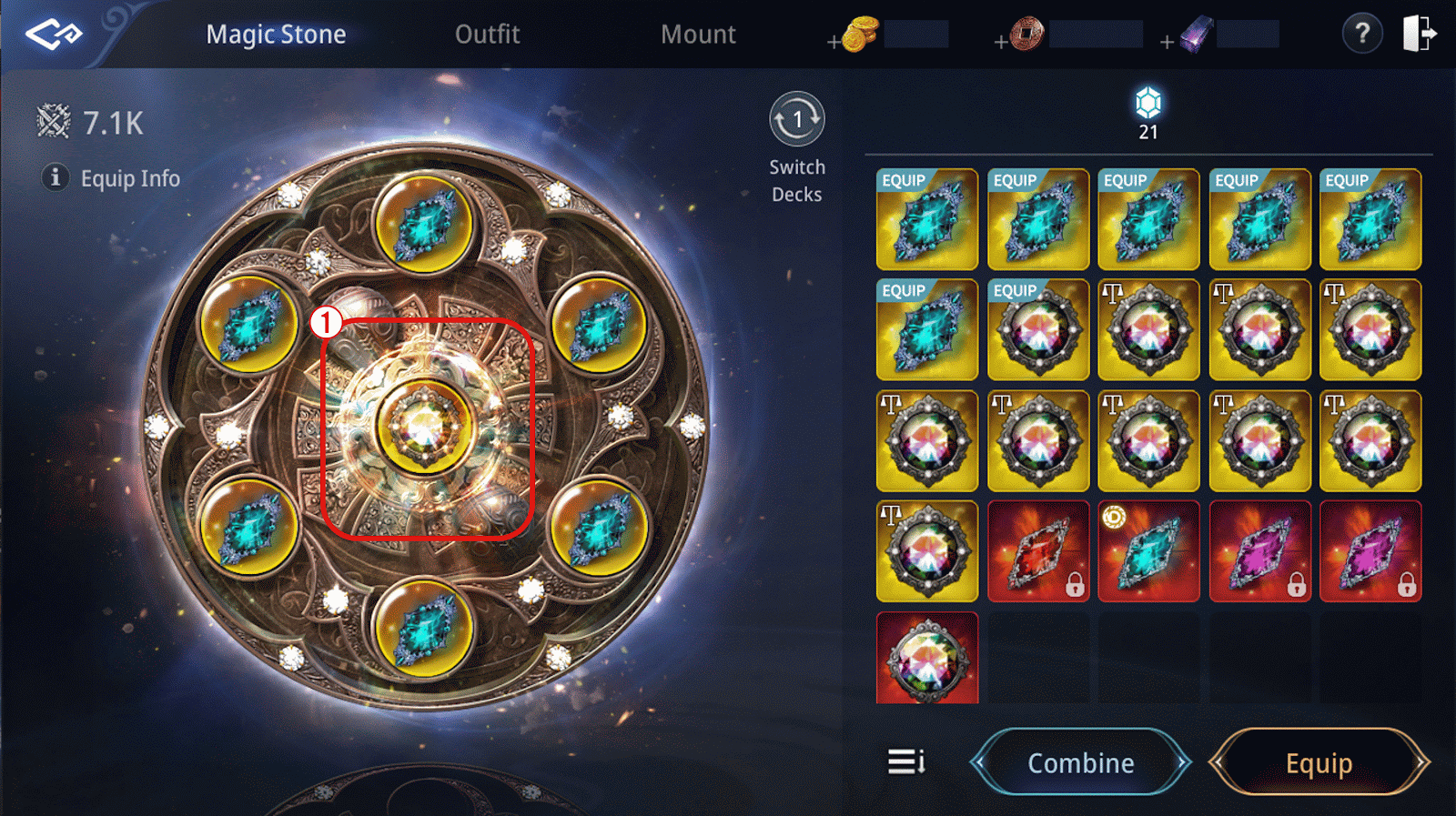
① Enable to equip the Spectrumite in exclusive slot.
* Condition of opening the exclusive slot for the Spectrumite : Reaching Tower of Quintessence Lv.12
※ Epic/Legendary 'Magic Stone'/ 'Spectrumite' can be enhanced up to Lv. 7, and there will be a failure chance existing on Lv. 1.
※ Please refer to [Forge > Special Enhancement] for further details.
Mystical Piece
1. Mystical Piece
Tap the Mystical Piece tab on the upper left corner from Menu > Character > Secondary Equipment.
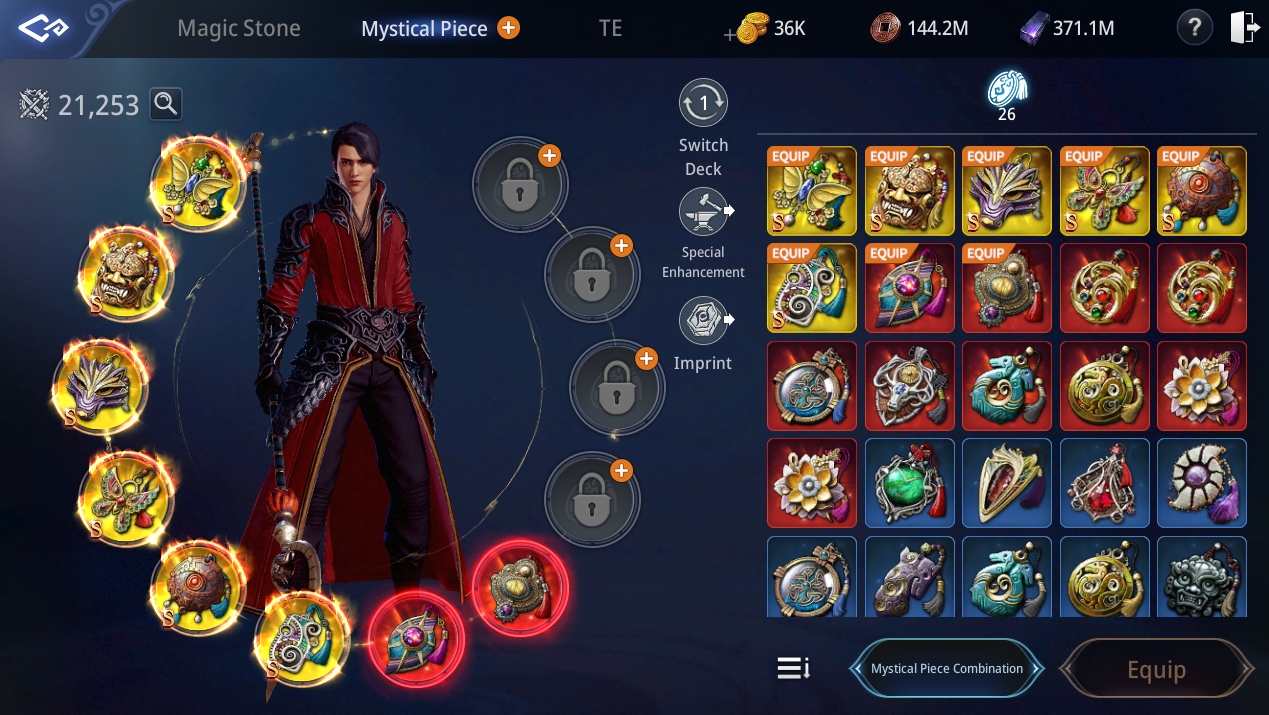
- The first slot for Mystical Piece is located at the top left, and the slot numbers are assigned counterclockwise.
- There are a total of 12 Mystical Piece slots, which unlock individually as you meet the following conditions:
① Slot 1: Reach Level 60
② Slot 2: Clear Tower of Victory Stage 7
③ Slot 3: Clear Tower of Victory Stage 9
④ Slot 4: Clear Tower of Victory Stage 11
⑤ Slot 5: Clear Tower of Victory Stage 13
⑥ Slot 6: Clear Tower of Victory Stage 15
⑦ Slot 7: Clear Tower of Victory Stage 17
⑧ Slot 8: Clear Tower of Victory Stage 19
⑨ Slot 9: Use 20 Rare Ancient Tablets
⑩ Slot 10: Use 20 Epic Ancient Tablets
⑪ Slot 11: Use 20 Legendary Ancient Tablets
⑫ Slot 12: Use 20 Legendary Divine Ancient Tablets
※ You can obtain Tablet Fragments from Fissured Magic Square, Secret Peak, and Hell Raid. Rare, Epic, Legendary, and Legendary Divine Ancient Tablets can be crafted in the ‘Craft Material’ tab.
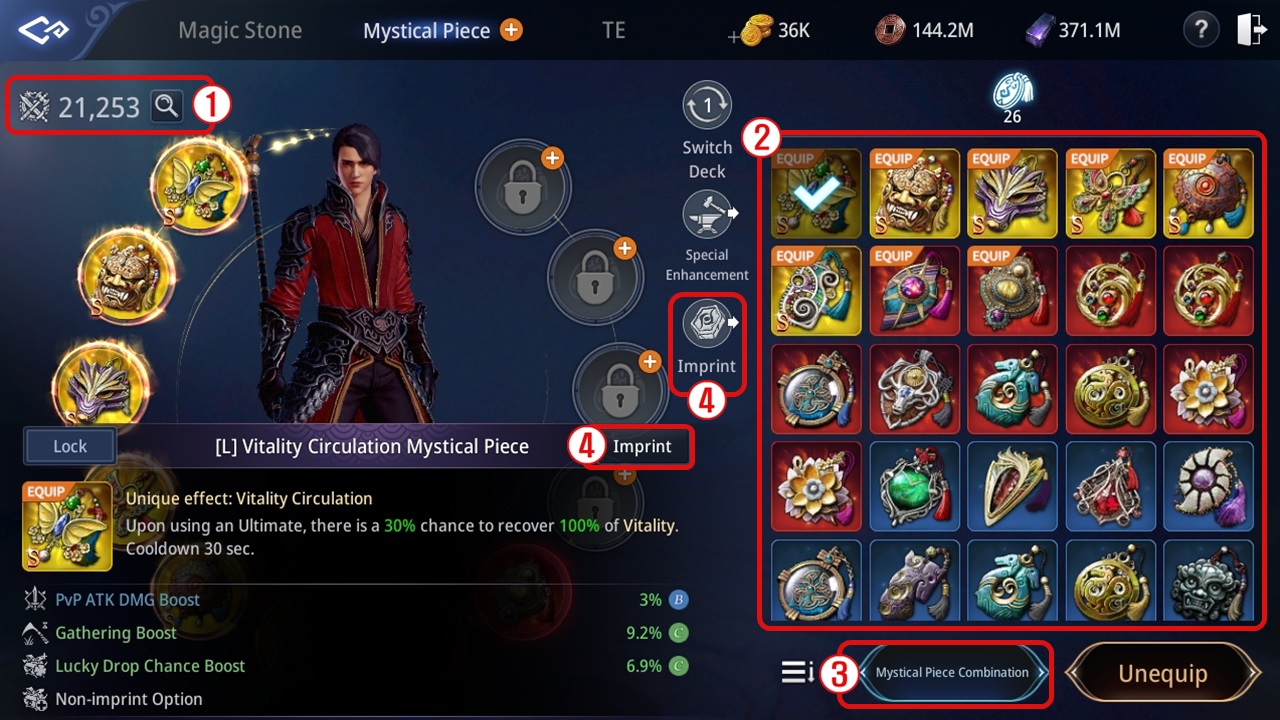
① See the information of the stats applied by equipping Mystical Piece.
② You can equip or unequip the mystical piece you own.
③ Tap 'Combine Mystical Piece' button to move to Craft > Other Combination from Combine > Mystical Piece tab.
④ Tap the 'Imprint' button to obtain or change the Imprint stats of a Mystical Piece.
- You can also use the 'Imprint' button in the item description of any Mystical Piece of rare grade or higher.
2. Mystical Piece Imprint
- Imprint is a feature available for Mystical Pieces of rare grade or higher.
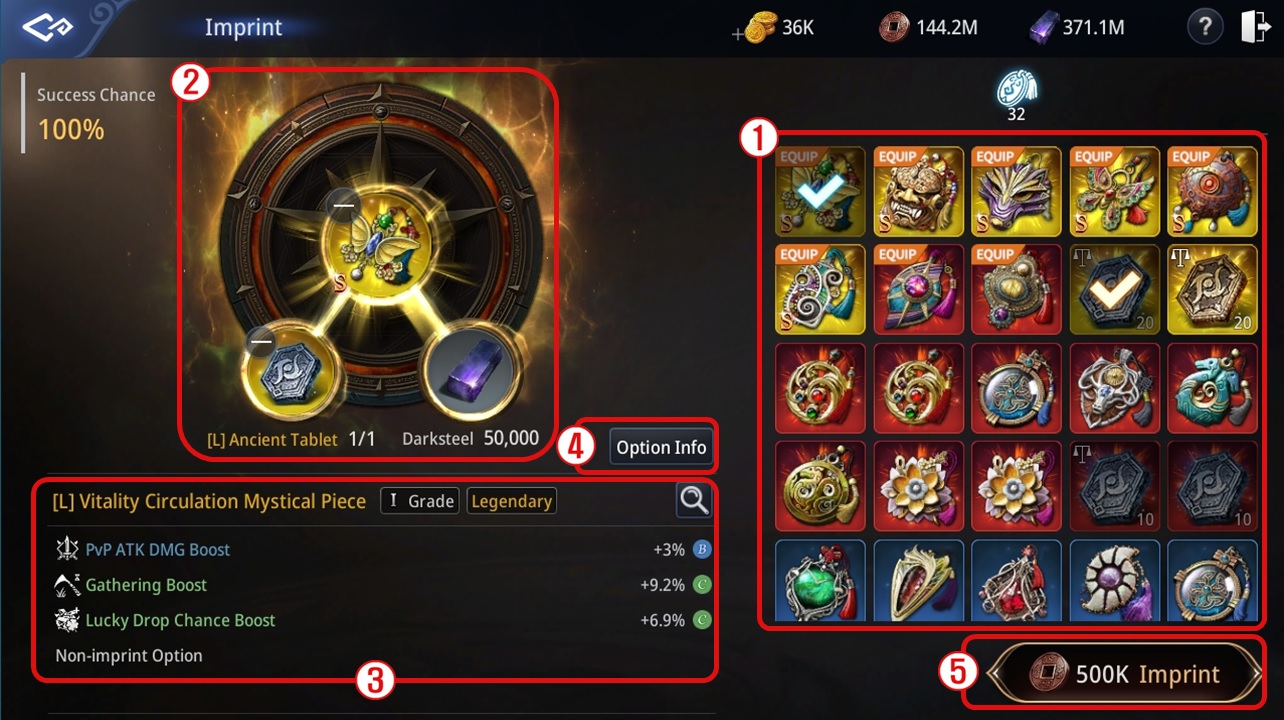
① Select the Mystical Piece to Imprint and the Ancient Tablet to be used as Imprint Material.
② You can check the number of Ancient Tablets and the amount of Darksteel needed to Imprint.
- The same grade of Ancient Tablet is required for Mystical Piece Imprint.
| Item | Material |
| Rare Mystical Piece | Rare Ancient Tablet x1 |
| Darksteel x5,000 | |
Copper x50,000 | |
| Epic Mystical Piece | Epic Ancient Tablet x1 |
Darksteel x10,000 | |
Copper x100,000 | |
| Legendary Mystical Piece | Legendary Ancient Tablet x1 |
Darksteel x50,000 | |
Copper x500,000 |
- The Legendary Divine Ancient Tablet can be used on Mystical Pieces of all grades, and the number required varies based on the grade of the Mystical Piece being Imprinted.
| Item | Material |
| Rare Mystical Piece | Legendary Divine Ancient Tablet x1 |
| Darksteel x10,000 | |
| Copper x100,000 | |
| Epic Mystical Piece | Legendary Divine Ancient Tablet x2 |
Darksteel x20,000 | |
| Copper x200,000 | |
| Legendary Mystical Piece | Legendary Divine Ancient Tablet x3 |
| Darksteel x100,000 | |
| Copper x1,000,000 |
- The effects applied during Mystical Piece Imprint depend on the type of Ancient Tablet used.
| Type | Material | Applied Effect |
Imprint a Mystical Piece Without an Imprint Option | Rare/Epic/Legendary Ancient Tablet | Adds 1 Imprint Option |
| Legendary Divine Ancient Tablet | Adds 1 Imprint Option and changes Basic/Additional Properties Effects | |
| Imprint a Mystical Piece With an Existing Imprint Option | Rare/Epic/Legendary Ancient Tablet | Changes Imprint Option Effect |
| Legendary Divine Ancient Tablet | Changes Imprint Option Effect and Changes Basic/Additional Properties Effects |
③ Check the Basic Properties and Imprint Options of the registered Mystical Piece.
④ View detailed information about the stats that can be obtained through Imprint.
- The Basic/Additional Properties of Mystical Pieces can range from C to SS grade, while Imprint Options can range from B to SS grade.
⑤ Use resources to proceed with Mystical Piece Imprint.
※ Epic/Legendary 'Mystical Piece' can be enhanced up to Lv. 7, and there will be a failure chance existing on Lv. 1.
※ Please refer to [Forge > Special Enhancement] for further details.
Outfit
- Tap Character - Outfit tab in the Menu.
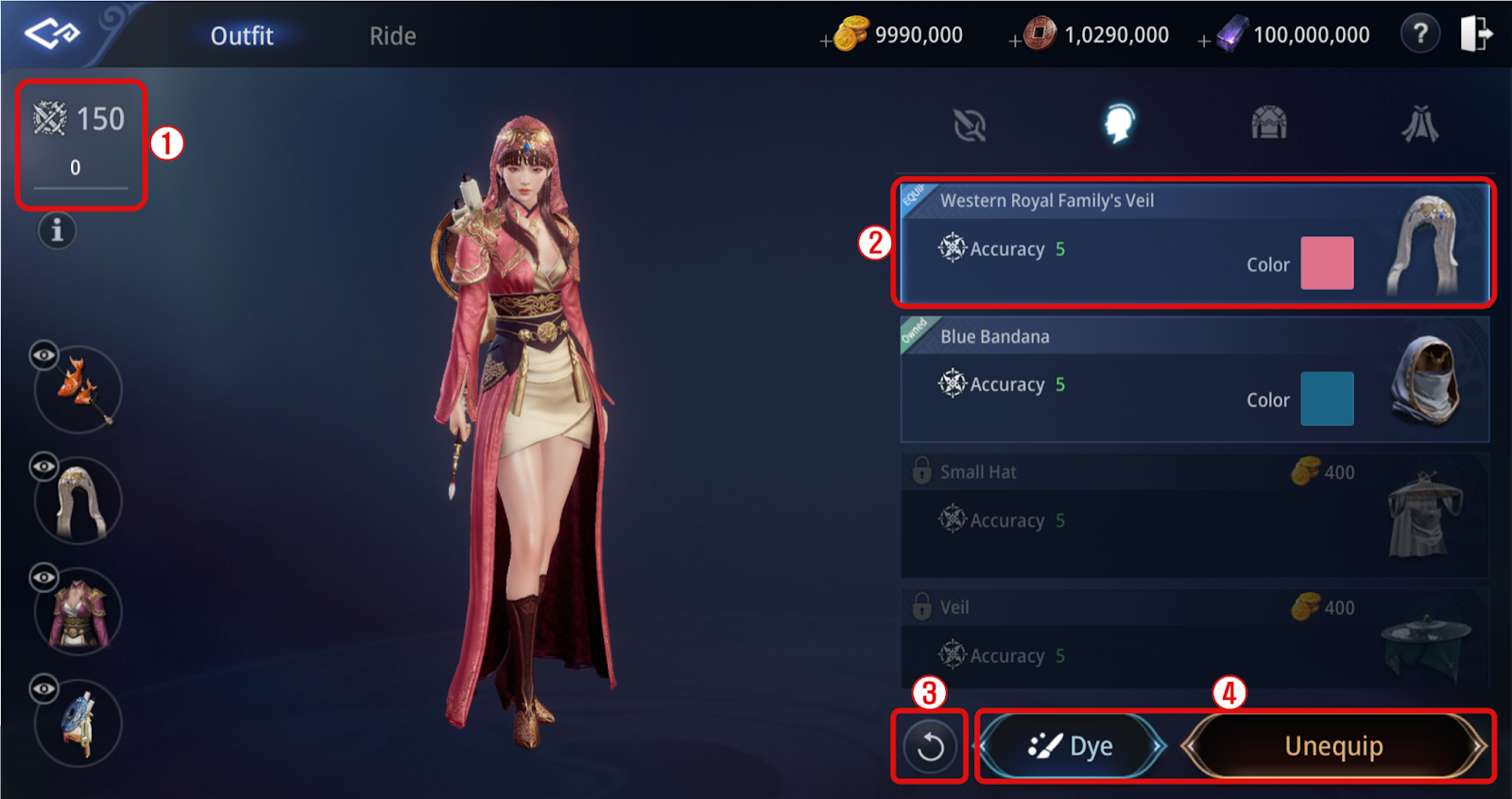
① Check the accumulated stats applied by the outfit
② You can tap the outfit to preview it
③ Tap the arrow button at the bottom of the outfit equipment list to reset the preview
④ Tap a purchased equipment to dye or equip/remove
Ride
- Tap Character - Ride tab in the Menu or click the Ride tab at the top left of the Outfit window.
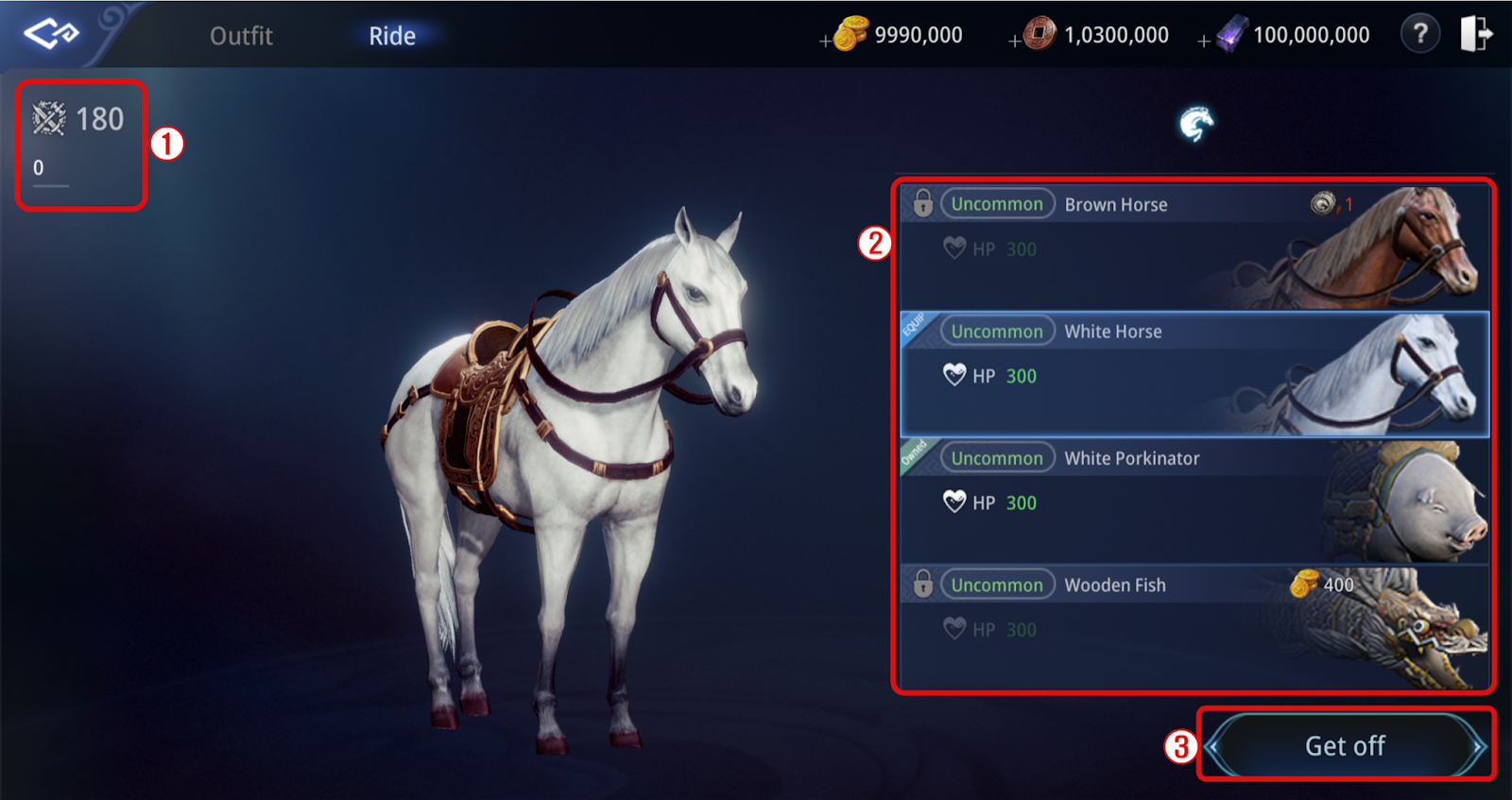
① Check the stats increased by owning mounts
② Check the stats that can be gained by purchasing a mount
③ Purchase a mount or ride/dismount
Wearable
Wearables are Appearance Equipments and Mounts with XDRACO properties.
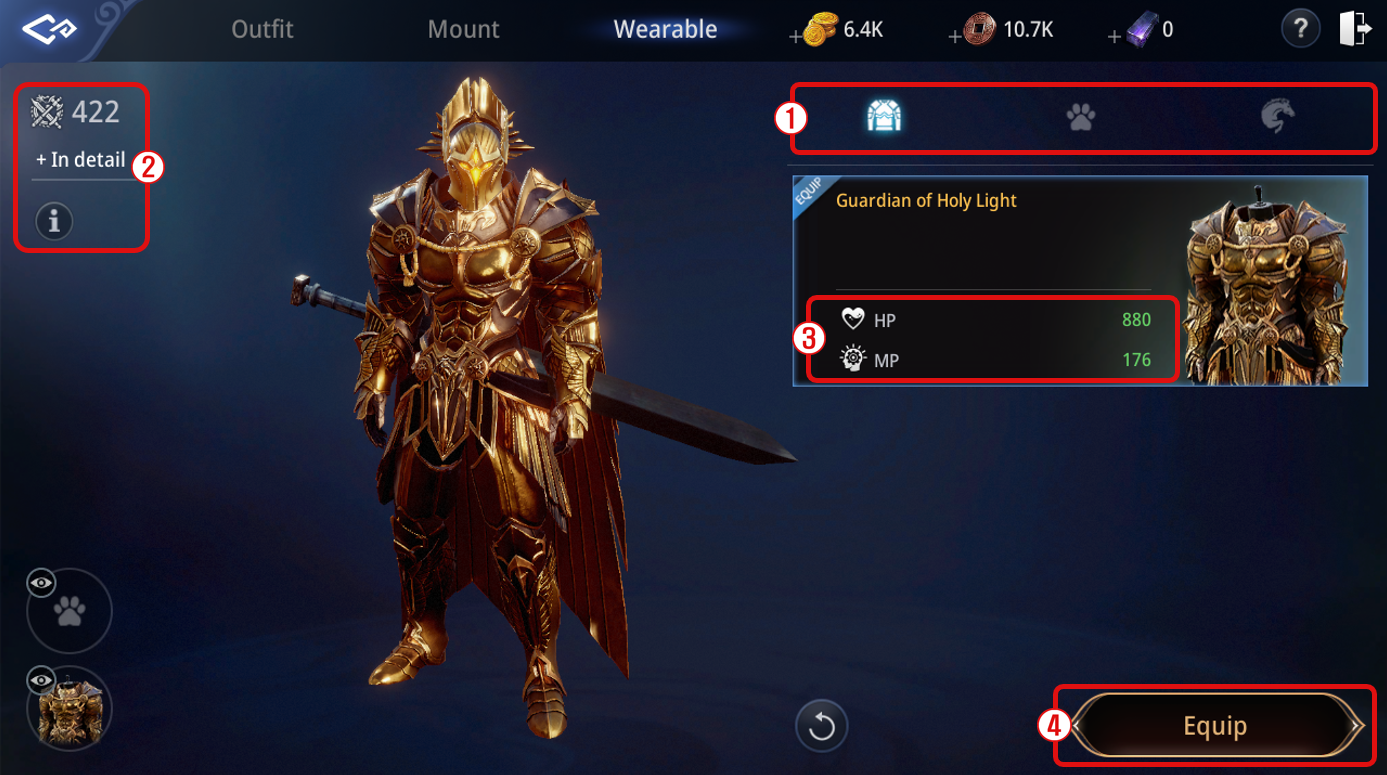
① Choose types of the Wearable Appearance Equipments (Outfit Equipment, Spirit, Mount)
② Check the number of stats added from all the Wearable Appearance Equipment equipped at the moment.
③ Check the additional stats obtainable from equipping the Wearable Appearance Equipment.
④ Click to 'Equip' or 'Unequip' the Wearable Appearance Equipment that you possess.
※ Wearable Appearance Equipment can be purchased or sold from the EXD or in-game market.
※ Wearable Mount Equipment can be obtained by crafting a "Mount Ornament Box" through <Admiration Point Exchange> Seo Kyungwoo.
Disenchant
- Click the [Disenchant] button located at the bottom right of the equipment screen to access the Disenchant interface.
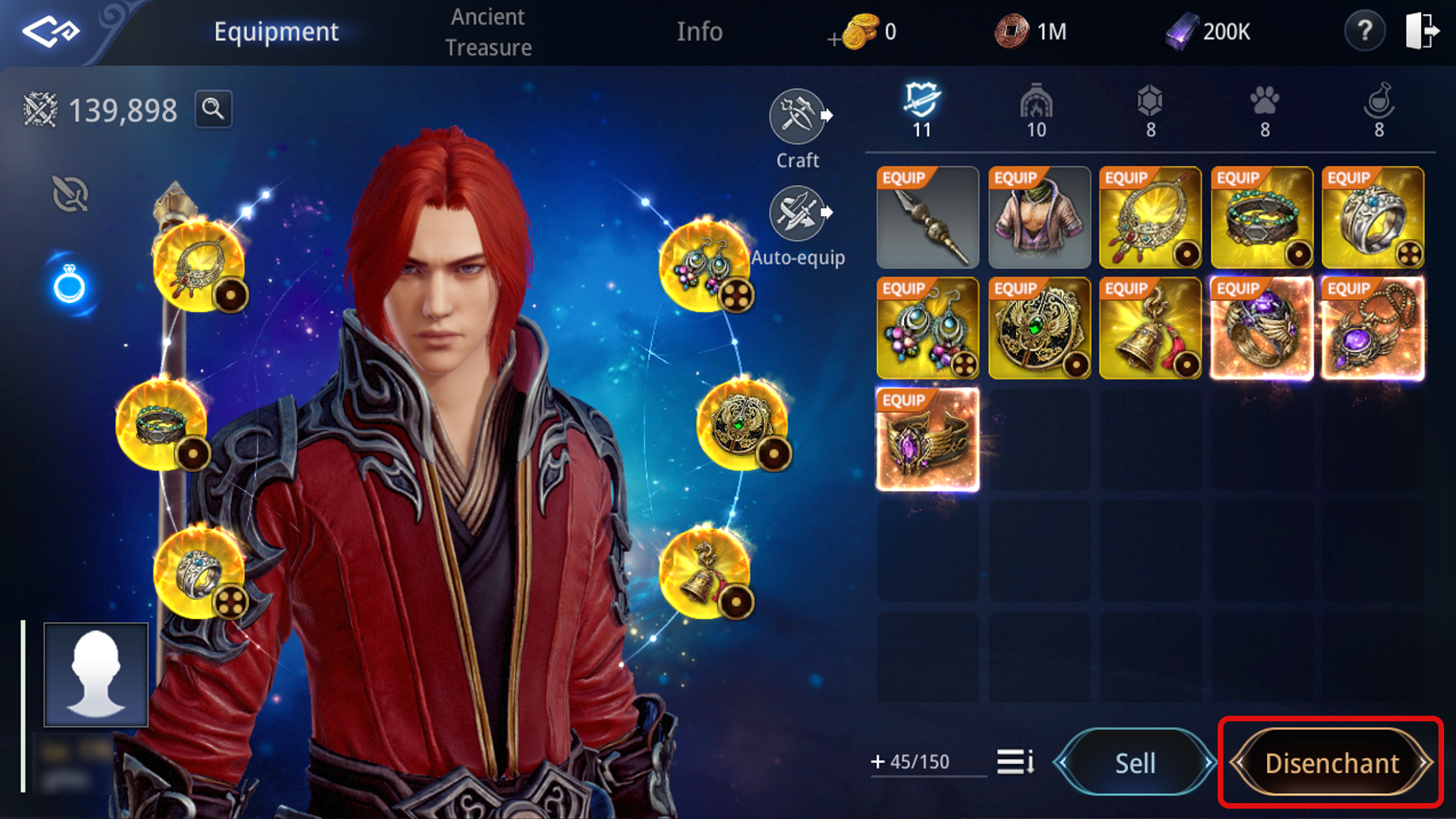
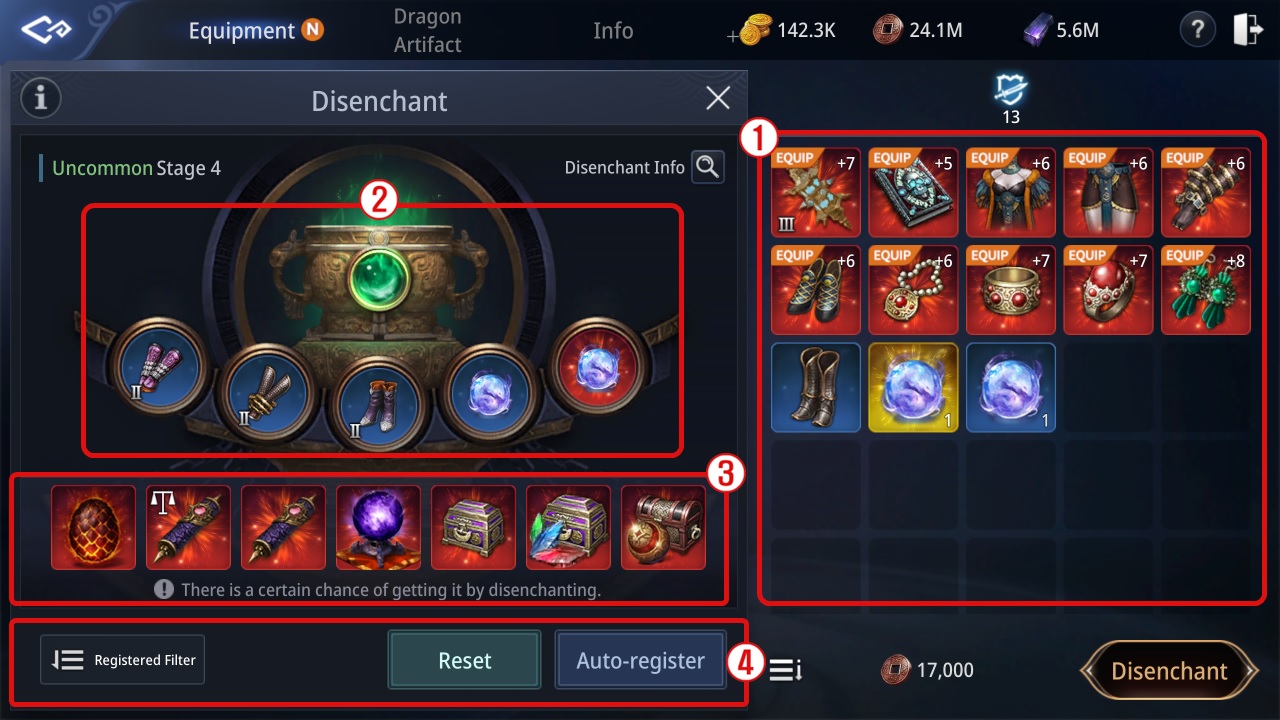
① You can select equipment for Disenchant on the right side of the screen.
- Disenchant can only be performed on Rare or Epic-grade equipment.
② You can check the registered equipment and Disenchant stages on the left side of the screen.
- The higher the grade, tier, or enhancement level of the registered equipment, the better the rewards you can obtain.
③ When performing Disenchant, you can acquire one item from the list displayed at the bottom.
④ You can automatically register equipment or reset the registration list using the [Auto-assign] and [Reset] buttons.
- You can adjust the settings for the [Auto-assign] button through Assign Filter.
Document update date : 2026-03-30